You’re down to two satellite options—what actually matters in the next 12–24 months?
You can read two satellite ads that look nearly identical, then watch the connection behave very differently at 7–10 p.m. That’s the window that matters over the next 12–24 months: how each plan handles your busiest hours, not the best-case speed in a quiet test.
With Viasat and Hughesnet, the deciding factors usually aren’t the headline Mbps. It’s how quickly latency shows up in Zoom work, what happens after you burn through priority data, and how much the “monthly price” grows once equipment, lease fees, installation, and future price changes hit. The hard part is you often can’t trial this risk-free.
So before you compare plans, pin down how your household will actually use the connection day to day.
Before you compare plans, how will your household really use the connection?
That day-to-day use is usually where people misjudge satellite. A plan that feels fine for email and browsing can bog down when two TVs stream at the same time and someone jumps on a video call during the 7–10 p.m. rush.
Start by listing your “must-work” activities and when they happen. If you work from home, note how often you’re on Zoom/Teams, and whether you upload large files. If you have kids, count the always-on devices—tablets, game consoles, smart TVs—and whether they stack usage after school. Then decide what “streaming” really means in your house: one HD stream, multiple HD streams, or 4K on a big screen.
The constraint is you can’t average this out across the month. One heavy week can push you past priority data, and one busy evening can make the connection feel “broken” even if the plan looks fast on paper. Once you’ve mapped your peak-hour habits, latency becomes the next filter.
When “fast” still feels slow: latency and what it does to Zoom, Gaming
Latency is usually the moment you realize “fast enough” on paper can still feel bad at 8 p.m. Pages may load, but the delay between a click and a response makes everything feel sticky—especially when your traffic has to travel up to a satellite and back before it ever reaches the website or work server.
On Zoom or Teams, high latency shows up as people talking over each other, awkward pauses, and audio that recovers late after a brief hiccup. The delay stacks up when you’re opening shared files, running remote desktop, or using cloud apps that refresh constantly.
Gaming is the most unforgiving. Even if a speed test looks decent, the extra delay can turn shooters, sports games, and anything timing-based into a frustrating experience, and voice chat can lag behind gameplay. The limitation: you can’t “buy” your way out of latency with a higher Mbps tier on traditional satellite—so the next question is what happens when the network gets crowded and you hit your data policy.
The data policy tripwire: what happens after you hit the cap (and how ugly peak hours get)
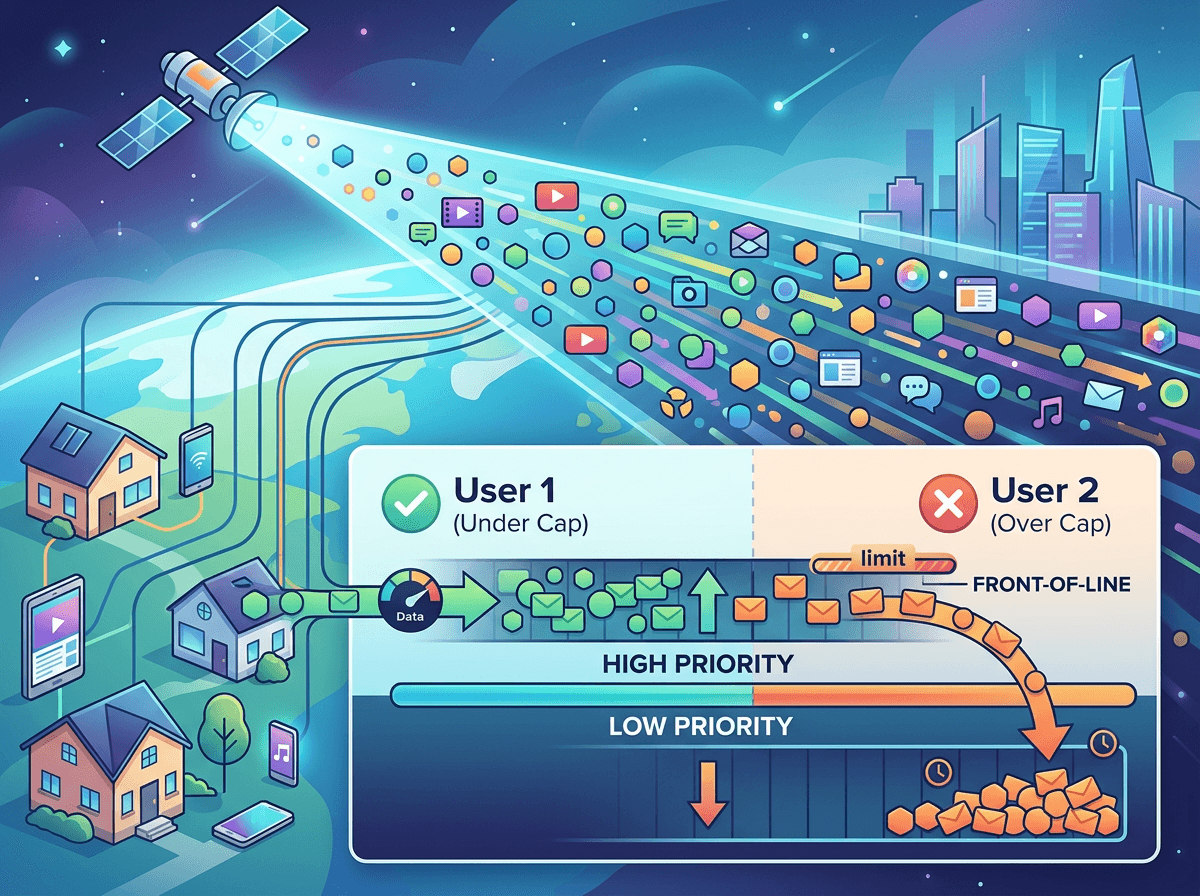
After you hit your priority data, the connection often changes in a way speed tests don’t warn you about. A movie may still start, but it drops to lower quality, buffers more, or takes longer to “lock in” during 7–10 p.m. Work use can feel worse: cloud apps refresh slowly, attachments crawl, and Zoom can turn choppy even though you’re not doing anything new.
What’s happening is simple: your traffic stops getting first-in-line treatment on a crowded beam. With Viasat and Hughesnet, that usually means you’re deprioritized (and sometimes throttled depending on plan and policy), so peak-hour congestion hits you harder than it did earlier in the month. The real-world downside is you can burn through priority data without realizing it—one weekend of HD streaming, game downloads, phone updates, and a few video calls can push you over.
Before you order, ask exactly what happens after the cap: is it a set reduced speed, “as available” during congestion, or both—and can you buy more high-priority data mid-month? Then you can compare the cost of staying usable, not just the advertised plan price.
The number on the ad isn’t your bill: fees, equipment, installation, and price changes
That “cost of staying usable” is where the advertised monthly price stops being helpful. On the order call, the number you saw online is usually the service line item, not the whole bill you’ll pay once the modem/dish, leasing, and add-ons are included.
Ask for an all-in monthly estimate that separates service, equipment (lease vs purchase), and any “optional” protection plans. Then ask about one-time charges: standard installation, non-standard installs (extra cable runs, pole mounts, roof work), and shipping. If you’re budgeting tightly, confirm whether taxes or state fees get added on top, because that can swing the total more than people expect in rural areas.
The practical snag is price changes. Promos often end mid-contract, and some plans allow rate increases with notice. Get the regular price in writing, the promo end date, and what happens if you pause, move, or swap plans—then your address becomes the next variable to pressure-test.
Your address decides more than the plan: availability, beam congestion, and dish placement

That “address” variable shows up fast when you try to order. Two neighbors can see different plan options, different expected speeds, or no availability at all, because capacity is managed by spot beams and local demand. If a beam is crowded, peak-hour slowdowns can be baked in before you even hit a data cap, and the provider may only offer lower tiers until capacity frees up.
On the call, ask what plans are available specifically at your service address and whether the beam is known to be congested in the 7–10 p.m. window. Then get concrete about the install: you need a clear line of sight to the satellite, and trees that look “mostly fine” can become a problem once leaves come in or weather turns. If you’ll need a pole mount, trenching, or a long cable run, the cost and scheduling hassle can be the difference between “installed next week” and “still waiting next month.”
Once you know you can actually get a clean, stable install at your address, the last step is making sure you can walk away if it doesn’t live up to the promise.
Signing without regret: contract length, cancellation costs, and what to confirm on the order call
That “walk away” part is where most regret starts: the first bill arrives, peak hours feel worse than expected, and you realize you signed a long commitment. Ask for the exact contract length, the early termination fee schedule (not just “up to”), and whether it drops over time. Also confirm any trial window, what “30 days” means in their system, and whether you must return equipment by a specific date to avoid extra charges.
On the order call, don’t leave with vague promises. Have them read back your service address, the plan name, the priority data amount, what happens after you hit it, the full monthly total (service plus equipment lease and add-ons), and the promo end date. Then ask what changes if you move, pause service, or upgrade mid-contract. If they won’t put the key terms in writing, keep shopping.